Corresponding information from the official website Telkomsel , Telkomsel Flash APN settings are as follows
Use APN : flash , for choice Package Regular Time Based .
Use APN : telkomsel or internet , for Regular Volume Based Package option .
We are sorry for rare article is updated ..
Also apologize because I can not answer all questions about the problems with the modem installation Telkomsel Flash card because of the problem vary depending on the brand modem , operating system used , and the type of computer used . Modem for troubleshooting problems with Telkomsel Flash , please ask the vendor to the modem or to Grapari :) Thank you .
***
Today many devices that can be used as a modem to access the internet and of course those devices require adjustment in accordance with the card being used . Here's a guide for setting the devices to be connected with Telkomsel Flash . This setting can also be obtained in the form of a PDF file in the Device and Setting Telkomsel Flash . Previously , make sure that you have registered with Telkomsel Flash Flash typing and send it to 3636 and make sure that the driver of the modem installed in your PC . If you are asked to fill in a PIN , enter the PIN number of the card you Telkomsel .
TelkomselFlash USB Modem ( HUAWEI E220 )
After installing the driver , open the Mobile Connect program
Open the Network Connection Settings dialog box from the Settings menu bar , then create a new profile and fill in as below

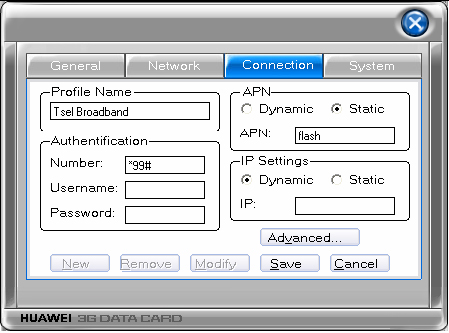
HUAWEI E620
After installing the driver, open the program HUAWEI 3G Datacard
Click the Settings icon (the icon in the bottom row, second from right number), then open the Connection tab and click New to create a new profile
Fill in the settings as below
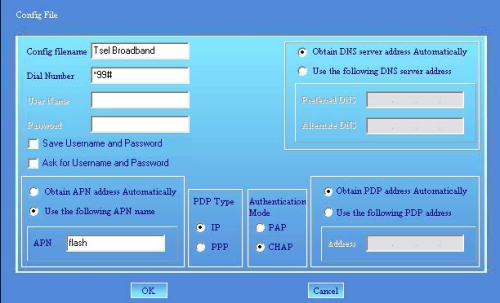
ZTE MF320/330
Install the driver provided with the sales package and then open the program UMTS GPRS Wireless Card
Click the Settings icon (screwdriver icon in the top row; number 6 from the left), and then open the Config File tab and click Add to create a new profile
Fill in the following parameters, click OK, and then set that profile as the default profile by click Set Default
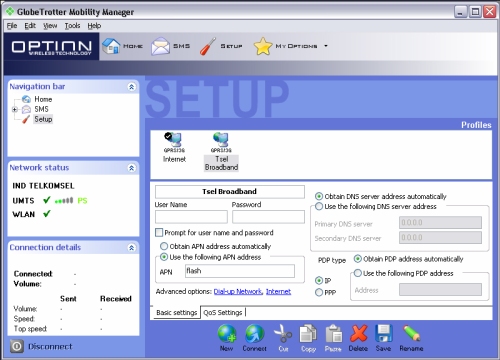
OPTION GlobeTrotter
Open the program GlobeTrotter Mobility Manager
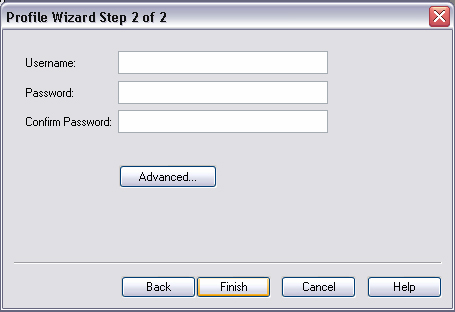
Click the Setup icon (icon screwdriver icon in the upper row). Dialog box will appear New Profile Wizard. Select Set up my profile manually set up the options and select 3G/GPRS on the type of profile to be created
Fill in the following parameters
On the home page, it will create profiles Tsel Broadband icon. Right-click the icon, and then click Set as default profile.
*
NOVATEL Wireless MERLIN
Open the program Mobilink
Click the icon image-blue three-line at the top left of the interface program and then select Profile Manager.
Create a new profile by selecting the button Newdan fill in the following parameters
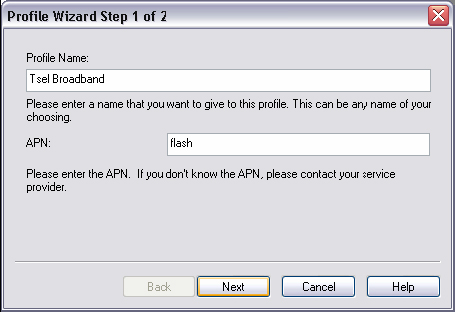
SIERRA Wireless Aircard
Open the AirCard 800 Series Watcher program
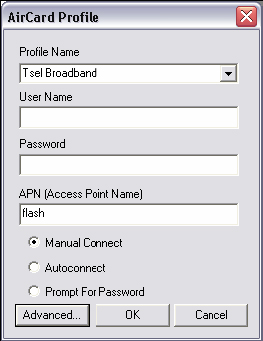
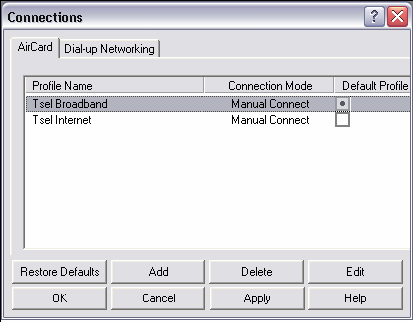
Click the Tools menu and then select Connections for connection settings, and click Add to create a new profile
Perform configuration as shown below
Click the radio button to the right of the profile Tsel Broadband To set it as the default profile
Nokia handset
Make sure that Nokia PC Suite installed on your PC
Open Nokia PC Suite program
Connect your phone to PC via data cable / bluetooth / infrared (with a data cable connection is more stable) and select PC Suite on HP
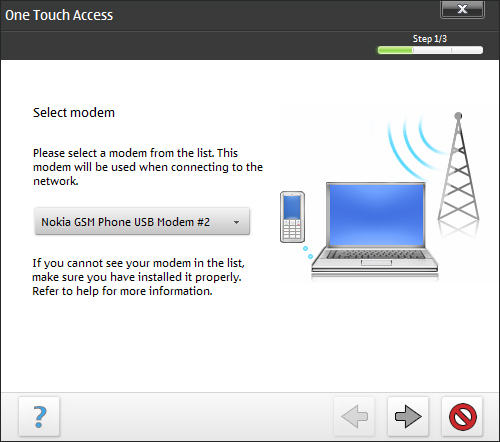
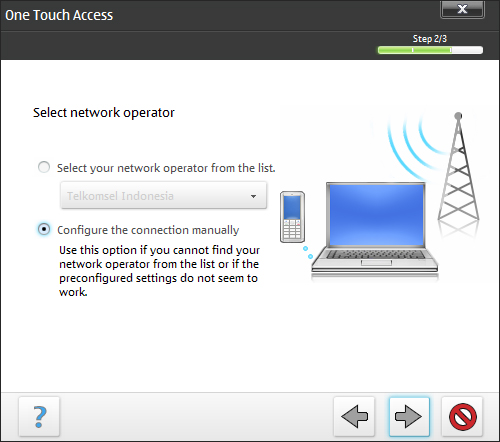
Click Connect to the Internet icon (globe picture) to open the One Touch Access application
Click the Configure icon to configure the settings
Select the modem / phone that you use
Click the radio button Configure the connection manually to perform manual settings
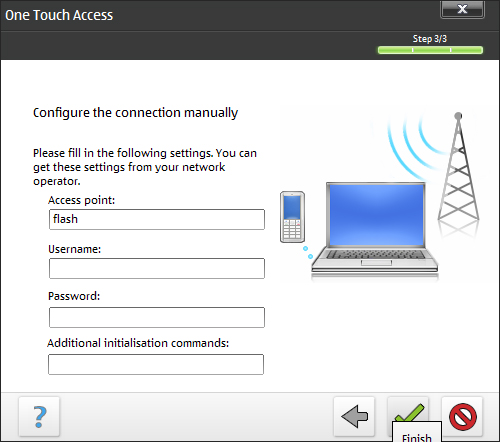
Fill in the parameters as below and click the Finish icon (icon image tick)
Sony Ericsson handsets
Make sure the Sony Ericsson PC Suite has been installed on your PC
Open Sony Ericsson PC Suite program
Connect your phone to your PC and select the mode on the phone Phone
In the face of the display PC Suite, click Mobile Networking Wizard icon (picture globes, magic wand, and Star)
Click the File menu and select New Connection ...
Select Packet Switched Data
Enter the Connection Name and tick the checkbox Make this your default connection
Select Manual mode for this type of arrangement
Enter the following parameters
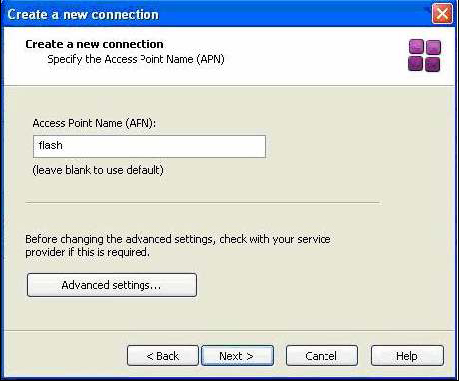
For more settings click Advanced Settings
*
other devices
For other devices, the settings almost exactly the same. The difference is only on the interface of the program / driver of the device. The settings include
Connection name: Tsel Broadband
Authentification number: * 99 #
Authentication protocol: CHAP
Username and password: (dikosongi only)
APN Settings: Static
APN (Access Point Name): flash (for time-based) or the internet (for volume based)
IP, DNS, and WINS settings: Dynamic
Note: all images on this post were taken from PDF device and setting Telkomsel Telkomsel Flash in website